
Tableau Data Visualization
Learn to create your own Maps, different functions, charts, dashboard for data visualization
About Tableau Data Visualization
Data Analytics is a process of inspecting, cleansing, transforming and modeling data with the goal of discovering useful information, informing conclusions and supporting decision-making.
Tech Cryptors Training Academy’s Tableau Data Visualization course is about Data Analytics using TABLEAU. It contains learning basic to advance TABLEAU which is Industrial Level software, used by leading companies in data analytics. Which helps us to create Dashboards, Data Visualization & many more things to understand data in more better ways & for analyzing. Analytics options, and doing automation which eventually results in making their work easy and graceful. Data analysis has multiple facets and approaches, encompassing diverse techniques under a variety of names, and is used in different business, science, and social science domains. In today’s business world, data analysis plays a role in making decisions more scientific and helping businesses operate more effectively.
We have Trained professionals from








Introduction to Tableau Data Visualization and its importance in Business Intelligence.
Understanding Tableau as a powerful data visualization and analytics tool.
Tableau setup, installation, interface, and practical navigation.
Exploring Tableau features, capabilities, and applications.
Understanding Dimensions, Measures, Discrete Fields, and Continuous Fields.
Understanding Blue and Green Pills and their applications.
Exploring Rows, Columns, Pages, Filters, and Marks Cards.
Understanding the Show Me panel and selecting appropriate visualizations.
Connecting Tableau to Excel, CSV, text files, and other supported data sources.
Connecting and working with multiple data sources simultaneously.
Reading multiple datasheets and combining data for analysis.
Understanding Live Connections and Data Extracts.
Creating, refreshing, and managing data extracts.
Entering data manually using Tableau's data-entry capabilities.
Understanding data types, field properties, and metadata.
Renaming fields, changing data types, and modifying field properties.
Identifying and handling null values, missing values, and inconsistent data.
Performing data cleansing and correcting common data quality issues.
Splitting and combining fields for data preparation.
Pivoting data to convert columns into rows and vice versa.
Preparing data for analysis by removing unnecessary fields and records.
Understanding data relationships and combining multiple tables.
Performing Inner Join, Left Join, Right Join, and Full Outer Join.
Understanding join conditions, keys, unmatched records, and duplicate-row issues.

Yes. Tech Cryptors Training Academy is an ISO 9001:2015 CERTIFIED COMPANY under IAF. CERTIFICATION will have the significance of the above.
We conduct this course in BOTH online and offline modes. You can choose the mode suitable for you, even you can SWITCH modes for a couple of lectures in case of any personal issues and emergencies.
In one batch we allow MAXIMUM 4 students Because we believe that to have a better understanding and to excel in this course PERSONAL ATTENTION is needed.
We have new batches starting every 15 days, But you should register asap for your desired date because our batches are filling fast. Batch timings are also kept AS PER YOUR TIME CONVENIENCE, we don’t have any rigid preassigned slots.
Well, you can SCROLL DOWN and click on WHATSAPP CHAT text OR CLICK HERE to talk with our customer care executive. We are happy to help you with all of your questions and details.
Performing Unions to combine datasets with similar structures.
Understanding the difference between Joins, Unions, and Relationships.
Understanding Data Blending and combining data from separate sources.
Preparing primary and secondary data sources for blending.
Understanding aggregation and its importance in data analysis.
Performing aggregations using SUM, AVG, MIN, MAX, COUNT, and COUNTD.
Understanding the difference between row-level and aggregate calculations.
Creating basic visualizations using dimensions and measures.
Learning to create and analyze vertical bar charts.
Learning to create and analyze horizontal bar charts.
Creating stacked bar charts for category-wise comparisons.
Creating side-by-side and grouped bar charts.
Sorting bar charts based on sales, profit, and other measures.
Displaying data labels, values, and percentages on bar charts.
Creating and analyzing line charts to identify trends over time.
Creating daily, monthly, quarterly, and yearly trend visualizations.
Comparing sales and profit trends across different categories.

Creating multiple-line charts for regional and segment-wise comparisons.
Creating and analyzing pie charts for category contribution.
Displaying percentage-of-total values in pie charts.
Creating and analyzing area charts.
Creating stacked area charts to compare category contributions over time.
Creating scatter plots to analyze relationships between numerical variables.
Analyzing the relationship between Sales, Profit, and Discount using scatter plots.
Creating bubble charts using size, color, and other visual attributes.
Creating histograms to understand numerical data distributions.
Creating box plots to analyze data spread and identify potential outliers.
Creating heat maps to compare measures across multiple dimensions.
Creating highlight tables with color-coded values.
Creating treemaps to visualize hierarchical data and proportions.
Creating packed bubble charts to represent values visually.
Creating dual-axis charts to compare two measures in one visualization.
Creating combination charts using bars and lines.
Synchronizing axes and formatting dual-axis visualizations.
Creating cross-tab views and text tables for detailed data analysis.
Selecting appropriate charts based on business requirements and analytical objectives.
Connecting geographic fields and assigning geographic roles.
Creating maps using country, state, city, and postal-code data.
Creating symbol maps to represent values using points and symbols.
Creating filled maps to visualize geographical performance.
Creating density maps where appropriate.
Visualizing sales, profit, and other measures across geographical regions.
Creating custom geographical groups using map selections.
Selecting geographical areas using Lasso and Radial selection tools where supported.
Comparing selected geographical regions against other regions.
Formatting maps using colors, sizes, labels, legends, and tooltips.
Performing basic sorting, ascending sorting, and descending sorting.
Sorting dimensions according to aggregated measures.
Creating filters using dimensions, measures, and date fields.
Applying wildcard, condition, and Top N filters.
Understanding Context Filters and the order of operations in Tableau.
Applying filters across multiple worksheets and dashboards.
Creating custom groups by combining dimension members.
Creating Sets to identify and compare selected data members.
Comparing Set members with non-members.
Creating and using calculated fields for customized analysis.
Performing arithmetic operations using calculated fields.
Creating calculated fields for Sales, Profit, Profit Margin, and Average Order Value.
Using aggregation functions such as SUM, AVG, MIN, MAX, COUNT, COUNTD, and ATTR.
Understanding aggregation errors and resolving aggregate versus non-aggregate calculation issues.
Using mathematical functions such as ABS, ROUND, CEILING, FLOOR, INT, ZN, POWER, and SQRT.
Performing percentage, ratio, difference, and growth calculations.
Using string functions such as LEFT, RIGHT, MID, LEN, UPPER, LOWER, TRIM, REPLACE, SPLIT, and CONTAINS.
Combining text fields and creating customized text outputs.
Using date functions such as YEAR, MONTH, DAY, DATEPART, DATETRUNC, DATEDIFF, and DATEADD.
Creating date-based calculations for monthly, quarterly, and yearly analysis.
Understanding logical expressions and Boolean conditions.
Using IF, ELSEIF, and ELSE statements in calculated fields.
Creating nested IF conditions for complex business logic.
Using CASE statements for conditional calculations.
Using logical operators such as AND, OR, and NOT.
Using IIF, IFNULL, and ISNULL functions.
Creating conditional categories for high, medium, and low performance.
Identifying profitable and loss-making products using calculated fields.
Creating custom business rules and classification fields.
Creating calculated fields to identify performance gaps and business exceptions.
Understanding Quick Table Calculations and their applications.
Calculating Running Totals for sales and profit.
Calculating Moving Averages to analyze trends.
Calculating Differences from Previous Values.
Calculating Percentage Differences between periods.
Calculating Percent of Total for categories and segments.
Applying Rank and ranking variations to identify top-performing records.
Calculating year-over-year growth and period comparisons where applicable.
Understanding addressing, partitioning, and calculation direction in table calculations.
Configuring table calculations across rows, columns, and dimensions.
Creating trend lines to analyze relationships between variables.
Understanding linear and other supported trend models.
Interpreting trend direction, strength, and statistical indicators.
Creating forecasts to estimate future values from historical data.
Configuring forecast periods and analyzing forecast results.
Understanding predicted values and uncertainty intervals.
Comparing historical performance with forecasted values.
Creating reference lines, average lines, and reference bands.
Formatting worksheets with customized titles, subtitles, labels, and axes.
Formatting numbers, dates, percentages, and currency values.
Customizing fonts, colors, borders, shading, and gridlines.
Configuring the Marks Card using Color, Size, Label, Detail, and Tooltip.
Creating customized tooltips to display additional business information.
Adding annotations to highlight important points, marks, and areas.
Using custom shapes in visualizations.
Importing and configuring custom shapes where supported.
Applying consistent formatting across worksheets and dashboards.
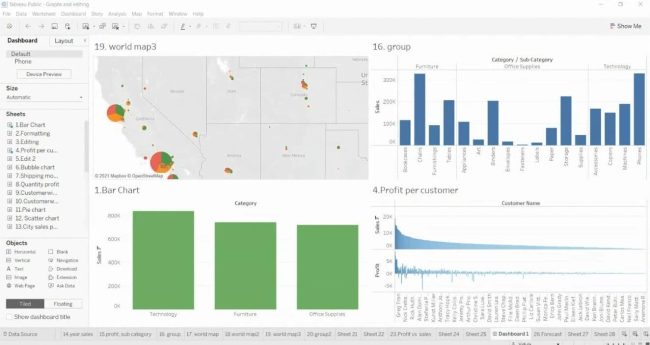
Creating dashboards by combining multiple worksheets.
Understanding tiled and floating dashboard layouts.
Arranging and resizing dashboard components using layout containers.
Adding charts, tables, filters, legends, and text elements to dashboards.
Creating interactive dashboards using filter actions.
Creating highlight actions to emphasize selected data.
Creating URL actions where applicable.
Using parameters to enable dynamic user-driven analysis.
Applying filters across multiple dashboard worksheets.
Designing dashboards for sales, profit, customer, product, and regional analysis.
Creating KPI dashboards to monitor business performance.
Formatting dashboard layouts for clarity, readability, and usability.
Understanding dashboard device layouts where applicable.
Creating page-based visualizations using the Pages Shelf.
Developing motion charts and animated visualizations using available playback features.
Analyzing changes in business performance across different time periods.
Customizing motion charts using colors, sizes, labels, and other visual attributes.
Understanding dashboard interactivity and navigation between visualizations.
Creating Tableau Stories using multiple worksheets and dashboards.
Organizing story points to communicate business findings.
Adding captions and descriptions to explain analytical results.
Developing data-driven presentations using Tableau Stories.
Exploring additional Tableau functions and features for advanced data analysis.
Applying best practices for effective data visualization and dashboard design.
Identifying misleading charts and improving visualization accuracy.
Optimizing dashboards for performance and efficient data analysis.
Validating calculated fields, aggregated values, and visual outputs against source data.
Performing practical exercises using the Sample Superstore dataset.
Analyzing sales performance by category, sub-category, region, and customer segment.
Comparing product profitability and identifying loss-making products.
Analyzing the impact of discounts on profitability.
Creating geographical sales and profit analysis using maps.
Building interactive dashboards with multiple charts, filters, parameters, and calculated fields.
Developing a complete Tableau project from data connection and preparation to visualization and dashboard creation.
Presenting business insights and findings through Tableau dashboards and stories.
Note For Certification
Earn Certificate
Share Your Achievement
Validated by Ethereum

Original Price
₹30,999 /Course
- Max 4 Students per batch
- 1 to 1 Interaction
- Online & Offline mode
- only Video Training
- limited sessions
- Big batches
Current Price
₹21,999 /Course
- Industry level content
- 100% Practical Training
- Experienced Trainers
- Certification for Course
- Corporate Level Examples
- Many other discounts ASK NOW

Reattempt
₹0/Course
- Free Reattempting of Course
- Long Term Support after Completion
- Free Doubt Solving Sessions / Chats
- Discount for Next Courses
- Real-Time Tasks
- Suggestions & Carrer Counselling
Original Price
₹26,999 /Course
- Max 4 Students per batch
- 1 to 1 Interaction
- Online & Offline mode
- only Video Training
- limited sessions
- Big batches
Current Price
₹19,999 /Course
- Industry level content
- 100% Practical Training
- Experienced Trainers
- Certification for Course
- Corporate Level Examples
- Many other discounts ASK NOW

Reattempt
₹0/Course
- Free Reattempting of Course
- Long Term Support after Completion
- Free Doubt Solving Sessions / Chats
- Discount for Next Courses
- Real-Time Tasks
- Suggestions & Carrer Counselling